
11 - Shell 执行与代码搜索
这是一套从 0 到 1 构建 Agent CLI 的分阶段实战教程。你会沿着REPL -> Agentic Loop -> Context Builder -> 工具系统 -> 工程化
的路线逐章推进,最终做出一个可运行、可扩展、可发布的完整工具。
技术栈:TypeScript + Node.js/Bun + React Ink + OpenAI 兼容 API
仓库在这:hello-agent-cli。
作者博客:https://www.riconext.cn/。
- 每章的代码按照分支存放在仓库中,分支名称为
chapter-xxx,本章代码分支chapter-11。 - 本章的代码改动会基于上节的代码进行改动,所以你可以直接查看上一节的代码学习,跟着本章的节奏一步步实现。
第 10 章我们在工具框架上挂载了 read_file、write_file、edit_file,让 Agent 可以安全地操作仓库文件。本章继续在同一框架上叠加另外两类高频能力:
glob— 按文件名模式快速匹配文件路径;grep— 按正则表达式在文件内容中搜索。
加上已有的 bash,这三个工具共同构成 Agent 的"代码搜索与执行"基础设施,几乎覆盖了 90% 的日常工程任务。
为什么不直接用 bash?
直觉上,bash grep -r 'TODO' . 完全能搜索内容,bash find . -name '*.ts' 也能列文件——为什么还需要独立的 glob 和 grep?
关键点在于,glob 和 grep 是只读的,不会对文件系统产生任何副作用。
| 维度 | bash | glob / grep |
|---|---|---|
| 读写语义 | 任意(可写) | 只读 |
| 参数声明 | 自由文本命令 | 结构化 JSON 参数 |
| 跨平台一致性 | 依赖 shell 实现 | 统一语义 |
| 权限审核 | 每次需要确认 | 可批量放行(第 17 章) |
| 输出格式 | 任意 | 固定结构,减少模型"解析噪声" |
claude BashTool 的实现中, 甚至在 prompt 中主动引导模型:
"File search: Use Glob (NOT find or ls)"
"Content search: Use Grep (NOT grep or rg)"
主要原因是 bash find 需要正确的 flag 才能跨平台工作,模型经常写出不可移植的命令;而 glob("**/*.ts") 的语义在所有环境下完全一致。
角色分工:
bash→ 运行测试、构建、git 操作等需要"执行"语义的任务;glob→ 按文件名模式找文件;grep→ 在文件内容中搜索正则。
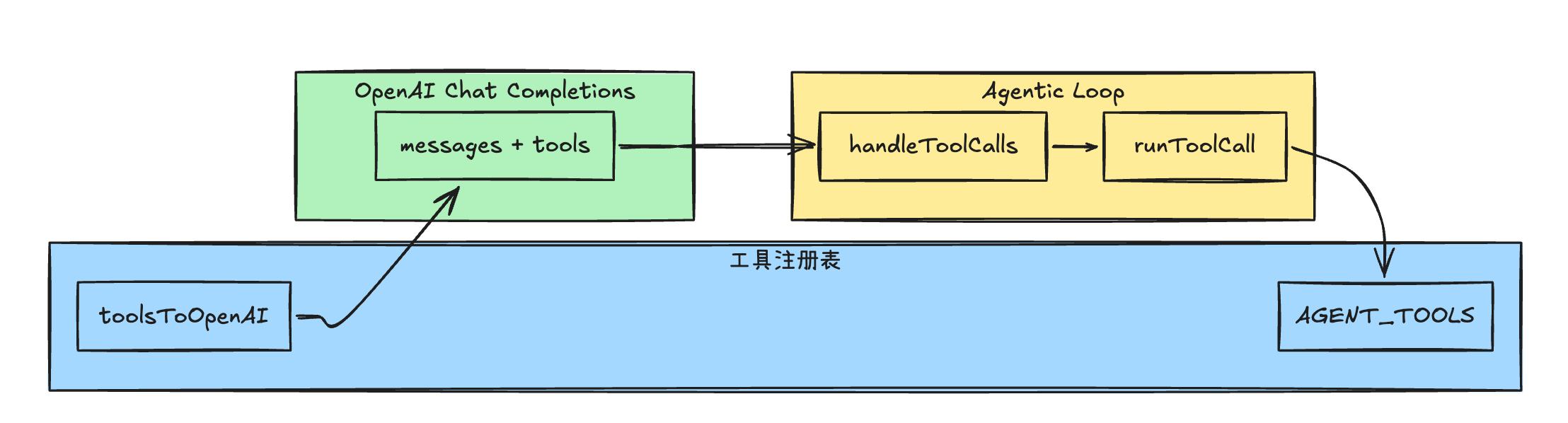
三个工具共享同一套 AgentTool 接口,挂在同一个 AGENT_TOOLS 注册表里,handleToolCalls 不需要任何改动:
代码实现
1. 实现 glob
新建 src/tools/glob-tool.ts。
核心实现:直接使用 Bun 内建的 Bun.Glob API,无需任何依赖。Bun.Glob.scan() 接受 { cwd } 选项,返回相对于 cwd 的路径,天然省去手动 relativize 的步骤。
还是按照 AgentTool 接口定义 name 和 toOpenAI:
// src/tools/glob-tool.ts
import type { AgentTool } from "./types";

// 最大返回文件数
const MAX_FILES = 100;

export const globTool: AgentTool = {
  name: "glob",
  toOpenAI: () => ({
    type: "function",
    function: {
      name: "glob",
      description:
        "按 glob 模式快速匹配工作区内的文件路径(如 '**/*.ts'、'src/**/*.tsx')。" +
        "查找文件名时优先使用本工具,而非 bash find 或 ls。" +
        "最多返回 100 条结果。",
      parameters: {
        type: "object",
        properties: {
          pattern: {
            type: "string",
            description: "glob 模式,如 '**/*.ts'、'src/**/*.{ts,tsx}'",
          },
          path: {
            type: "string",
            description:
              "搜索根目录(相对或绝对路径),省略则为当前工作目录",
          },
        },
        required: ["pattern"],
      },
    },
  }),
  async execute(args: unknown) {},
};
再实现 execute。逻辑分三步:解析参数 → 调用 Bun.Glob.scan() 遍历文件 → 返回带 truncated (是否截断)标记的 JSON。
// src/tools/glob-tool.ts
import path from "node:path";
import type { AgentTool } from "./types";

const MAX_FILES = 100;

export const globTool: AgentTool = {
  // ... 上面已实现,忽略展示
  async execute(args: unknown) {
    // 解析参数 pattern, path
    const a = args as { pattern?: unknown; path?: unknown };
    const pattern = typeof a.pattern === "string" ? a.pattern : "";
    if (!pattern.trim()) {
      return "错误:pattern 为空";
    }

    // 搜索根目录:有传 path 就 resolve,否则用 cwd
    const root =
      typeof a.path === "string" && a.path.trim()
        ? path.resolve(process.cwd(), a.path)
        : process.cwd();

    // 使用 Bun 内建 Glob,scan 返回相对于 cwd 的路径
    const glob = new Bun.Glob(pattern);
    const files: string[] = [];
    let truncated = false;

    for await (const file of glob.scan({ cwd: root })) {
      if (files.length >= MAX_FILES) {
        truncated = true;
        break;
      }
      files.push(file);
    }

    if (files.length === 0) {
      return JSON.stringify({ files: [], numFiles: 0, truncated: false });
    }

    // 字典序排序,结果稳定
    files.sort();

    return JSON.stringify({ files, numFiles: files.length, truncated }, null, 2);
  },
};这里有一个细节值得关注:Bun.Glob 的 scan() 是异步迭代器(AsyncIterableIterator),不会一次性把全部结果加载到内存。因此在循环里判断 files.length >= MAX_FILES 时立即 break,确保大型仓库下不会扫描数万文件才停下来。
2. 实现 grep
新建 src/tools/grep-tool.ts。
核心实现:调用系统 grep 命令(通过 Bun.spawn),与 bash.ts 中 executeBash 的执行方式完全一致。 区别在于:参数通过结构化 JSON 传入(而非让模型自己拼 shell 命令),输出经过行数限制,避免内容过长撑爆上下文。
claude 使用的是
ripgrep(rg),性能更好且内置.gitignore过滤。
教程使用系统grep,在 macOS / Linux 通用,无需额外安装依赖。
如果你的机器装了rg,只需把grep替换为rg并调整 flag 即可。
还是按照 AgentTool 接口定义 name 和 toOpenAI:
// src/tools/grep-tool.ts
import type { AgentTool } from "./types";

const MAX_LINES = 250;

export const grepTool: AgentTool = {
  name: "grep",
  toOpenAI: () => ({
    type: "function",
    function: {
      name: "grep",
      description:
        "在文件内容中搜索正则表达式,返回匹配行(带行号)。" +
        "搜索代码内容时优先使用本工具,而非 bash grep 或 bash rg。" +
        "支持递归搜索、文件类型过滤、大小写忽略。",
      parameters: {
        type: "object",
        properties: {
          pattern: {
            type: "string",
            description: "正则表达式,如 'function\\\\s+\\\\w+' 或 'TODO'",
          },
          path: {
            type: "string",
            description: "搜索目录或文件(相对或绝对路径),省略则为当前工作目录",
          },
          glob: {
            type: "string",
            description: "按文件名过滤,如 '*.ts'、'*.{ts,tsx}'",
          },
          case_insensitive: {
            type: "boolean",
            description: "是否忽略大小写,默认 false",
          },
        },
        required: ["pattern"],
      },
    },
  }),
  async execute(args: unknown) {},
};
再实现 execute。分三步:构建 grep 参数数组 → Bun.spawn 执行 → 处理输出(根据退出码判断是否找到匹配)。
// src/tools/grep-tool.ts
import path from "node:path";
import type { AgentTool } from "./types";

const MAX_LINES = 250;

export const grepTool: AgentTool = {
  // ... 上面已实现,忽略展示
  async execute(args: unknown) {
    // 解析参数 pattern, path, glob, case_insensitive
    const a = args as {
      pattern?: unknown;
      path?: unknown;
      glob?: unknown;
      case_insensitive?: unknown;
    };
    const pattern = typeof a.pattern === "string" ? a.pattern : "";
    if (!pattern.trim()) {
      return "错误:pattern 为空";
    }

    // 搜索根目录
    const searchPath =
      typeof a.path === "string" && a.path.trim()
        ? path.resolve(process.cwd(), a.path)
        : process.cwd();
    // 文件名过滤
    const globPattern = typeof a.glob === "string" ? a.glob.trim() : "";
    // 是否忽略大小写
    const caseInsensitive = a.case_insensitive === true;

    // 构建 grep 参数
    // -r: 递归  -n: 显示行号  --include: 文件过滤  --exclude-dir: 排除目录
    const grepArgs: string[] = ["-r", "-n", "--exclude-dir=.git"];
    // 添加忽略大小写参数
    if (caseInsensitive) {
      grepArgs.push("-i");
    }
    if (globPattern) {
      // glob 模式作为 --include 传入(如 "*.ts" → --include=*.ts)
      grepArgs.push(`--include=${globPattern}`);
    }
    // pattern 和搜索路径放最后
    grepArgs.push(pattern, searchPath);

    // 使用 Bun.spawn 执行,与 bash.ts 的 executeBash 保持一致
    const proc = Bun.spawn(["grep", ...grepArgs], {
      stdout: "pipe",
      stderr: "pipe",
    });

    const exitCode = await proc.exited;
    const stdout = await new Response(proc.stdout).text();
    const stderr = await new Response(proc.stderr).text();

    // grep 约定:exitCode 0 = 有匹配,1 = 无匹配,>1 = 出错
    if (exitCode > 1) {
      return `错误:grep 执行失败\n${stderr.trim()}`;
    }
    if (!stdout.trim()) {
      return "未找到匹配内容";
    }

    // 截断输出,防止撑爆上下文
    const lines = stdout.split("\n").filter(Boolean);
    const truncated = lines.length > MAX_LINES;
    const output = lines.slice(0, MAX_LINES).join("\n");

    return truncated
      ? `${output}\n…(截断,共 ${lines.length} 行,可缩小搜索范围)`
      : output;
  },
};
注意 grep 的退出码约定:0 表示找到匹配,1 表示没有匹配(不是错误),>1 才是真正的执行错误。
所以我们只对 exitCode > 1 才返回错误信息,exitCode === 1 时返回「未找到匹配内容」。
3. 注册到 AGENT_TOOLS
修改 src/tools/registry.ts,在文件头部增加 import,并把两个新工具并入列表:
// src/tools/registry.ts
import type { ChatCompletionTool } from "openai/resources/chat/completions";
import { bashTool } from "./bash-tool";
import { editFileTool } from "./edit-file-tool";
import { globTool } from "./glob-tool";
import { grepTool } from "./grep-tool";
import { readFileTool } from "./read-file-tool";
import type { AgentTool } from "./types";
import { uppercaseTool } from "./uppercase-tool";
import { writeFileTool } from "./write-file-tool";

export const AGENT_TOOLS: readonly AgentTool[] = [
  bashTool,
  uppercaseTool,
  readFileTool,
  writeFileTool,
  editFileTool,
  globTool,
  grepTool,
];

// toolMatchesName / findToolByName / findAgentTool / toolsToOpenAI 保持不变
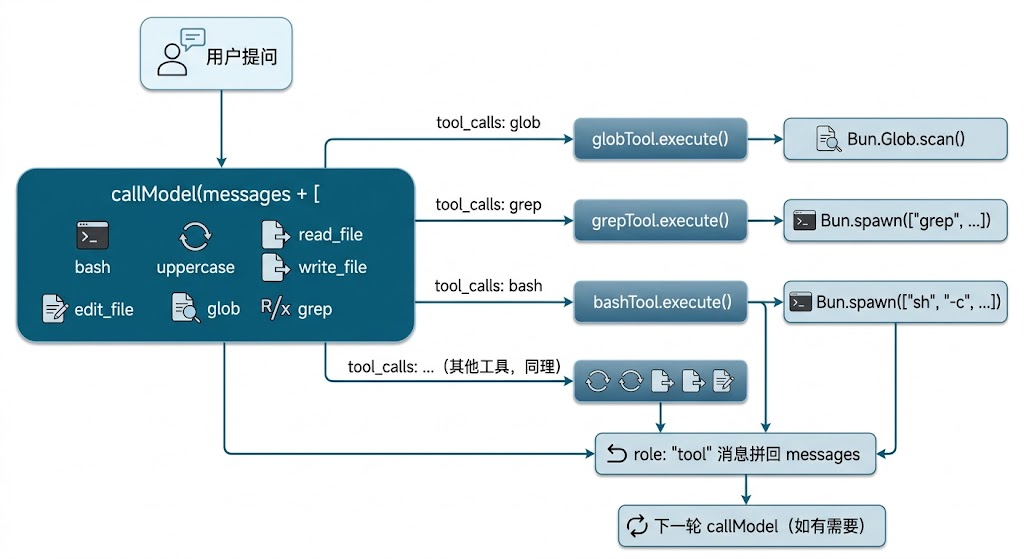
toolsToOpenAI() 会自动把新工具带进 API 请求,runToolCall 的分发逻辑不需要任何改动——这正是第 9 章统一调度层带来的收益。
4. 更新系统提示词
在 src/agent/loop.ts 的 BASE_SYSTEM 末尾补充搜索工具的使用规范,引导模型优先选择专用工具而非裸 bash 命令:
// src/agent/loop.ts

const BASE_SYSTEM =
  "你是命令行里的编码助手。" +
  "需要列文件、统计数量、跑测试时,优先用工具获取真实输出,不要编造结果。" +
  "若用户明确要求「只转大小写、不访问磁盘」,优先使用 `uppercase` 工具。" +
  "如果你需要修改文件,请先使用 `read_file` 工具读取文件,然后使用 `edit_file` 工具修改文件。" +
  // 新增:搜索工具使用规范
  "查找文件名时使用 `glob` 工具(而非 bash find 或 ls);" +
  "在文件内容中搜索时使用 `grep` 工具(而非 bash grep);" +
  "运行测试、构建、git 操作等需要「执行」语义的任务才使用 `bash` 工具。";
加这句话是因为模型如果不加约束,倾向于把所有任务都扔给 bash,而 bash find 的 flag 在 macOS / Linux 之间有差异,容易产生不可移植的命令。
三个工具的协作示意
完成注册后,工具调用链路如下图所示——glob 和 grep 完全复用第 9 章已有的 runToolCall 分发和 handleToolCalls 并发执行,没有新的控制流分支:
到这里就完整了本章代码的实现:完整代码
验证
使用 REPL 模式验证:
# 进入 REPL 模式
bun run src/index.ts

# 对话: 列出当前目录下所有 .ts 文件

# 对话: 找出所有含有 TODO 的代码行
期望行为(顺序不固定,取决于模型策略):
glob或bash先找测试文件(如glob "**/*.test.ts"或bash ls);bash执行测试命令(如bun test);- 如有失败,
grep或read_file定位出错位置; - 最终助手用自然语言给出摘要。
到目前为止我们已完成:在既有工具调度链路上无缝扩展 glob 与 grep,让 Agent 获得结构化、只读、跨平台的代码搜索能力,同时保留 bash 处理执行类任务。
下一章我们将继续在同一框架上实现网络工具(web_fetch、web_search、ask_user),进一步扩大 Agent 的信息获取边界。
感谢阅读。若你对本系列感兴趣,欢迎关注公众号「闲不住的李先森」,我们会持续更新 AI 全栈与 Agent 工程实践。
