
10 - 文件操作工具——读、写、编辑
这是一套从 0 到 1 构建 Agent CLI 的分阶段实战教程。你会沿着REPL -> Agentic Loop -> Context Builder -> 工具系统 -> 工程化
的路线逐章推进,最终做出一个可运行、可扩展、可发布的完整工具。
技术栈:TypeScript + Node.js/Bun + React Ink + OpenAI 兼容 API
仓库在这:hello-agent-cli。
作者博客:https://www.riconext.cn/。
- 每章的代码按照分支存放在仓库中,分支名称为
chapter-xxx,本章代码分支chapter-09。 - 本章的代码改动会基于上节的代码进行改动,所以你可以直接查看上一节的代码学习,跟着本章的节奏一步步实现。
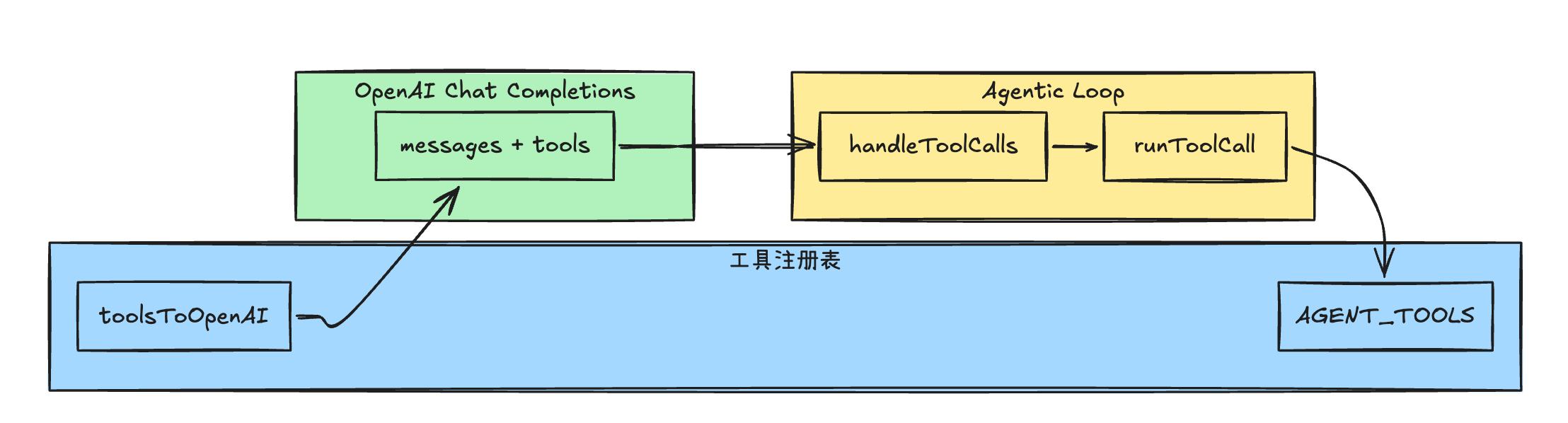
在第 9 章里,我们把「新增工具」收敛为了只要把工具函数的 AgentTool 定义添加到 AGENT_TOOLS 数组中, 就可以经过 toolsToOpenAI 函数生成适用于 OpenAI API 的 json schema,然后模型在 messages + tools 上推理;若有 tool_calls,循环里再经 handleToolCalls、 runToolCall 回到注册表执行这个工具函数。
本章我们将在这套工具注册&调用流程上挂载三个高频能力:
read_file、write_file、edit_file,让 Agent 能安全、可预期地操作仓库里的文本文件。
读(
read_file)
从磁盘读文本,返回带行号的视图(便于模型在后续edit_file里对齐缩进与上下文)。
支持大文件时分段(offset / limit)、路径规范化、权限与结果体积控制。写(
write_file)
整文件覆盖或新建。并在提示词中强调:覆盖已存在文件前必须先read_file,避免模型在 「未见过当前内容」的情况下整块重写;新建文件可例外。编辑(
edit_file)
对已有文件做精确替换(old_string→new_string,可选replace_all), 减少往上下文塞整文件 diff 的开销;同样要求先读后改,且old_string在文件中 必须唯一(否则报错,提示扩大上下文或改用replace_all)。
路径方面:教程使用 path.resolve(process.cwd(), file_path) 解析到绝对路径,并校验结果落在当前工作区 之下,作为纵深防御的雏形(后面讲到沙箱时会再扩展)。
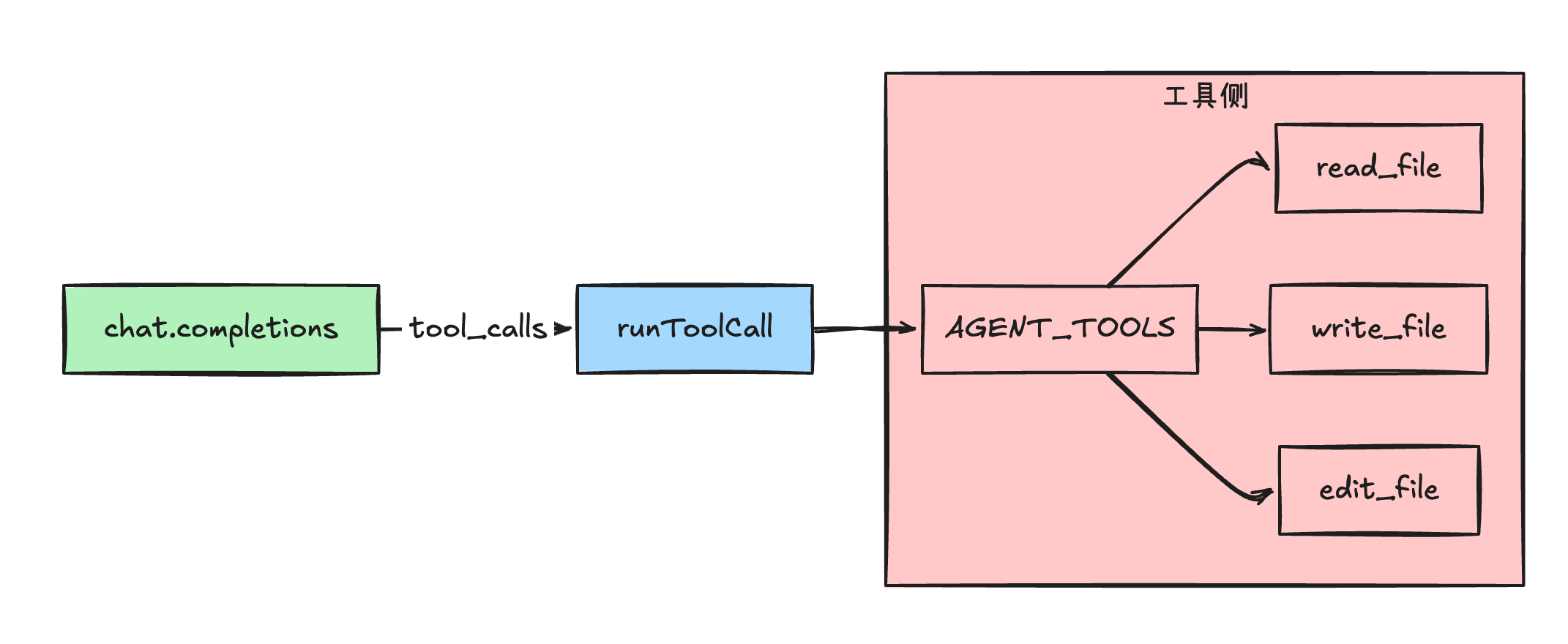
第 9 章已经确定:openaiTools 来自 toolsToOpenAI(),tool_calls 一律经 runToolCall 分发。本章只扩展 工具侧:
下面是代码实现环节
代码实现
1. 会话内「已读」记录与路径校验
新建 src/tools/file-session.ts,用 Set 记录本会话内已成功读取过的绝对路径。write_file(覆盖场景)与 edit_file 依赖它;write_file 成功后可以清除该路径 的「已读」标记,迫使模型在再次覆盖前重新读取。
并在文件内增加 assertPathInsideCwd 函数:解析后的路径必须落在 process.cwd() 之下,防止 ../ 逃逸。
// src/tools/file-session.ts

import { relative, resolve } from "node:path";

const readPaths = new Set<string>();

/** 相对路径相对于 process.cwd() */
export function toWorkspaceAbsolutePath(filePath: string): string {
  return resolve(process.cwd(), filePath);
}

// 标记文件为已读
export function markFileAsRead(absPath: string): void {
  readPaths.add(absPath);
}

// 清除文件的已读标记
export function clearReadMark(absPath: string): void {
  readPaths.delete(absPath);
}

// 判断文件是否已读
export function wasFileReadInSession(absPath: string): boolean {
  return readPaths.has(absPath);
}

// 断言路径是否在当前工作区之内
export function assertPathInsideCwd(absPath: string): string | null {
  const cwd = resolve(process.cwd());
  const rel = relative(cwd, absPath);
  if (rel.startsWith("..")) {
    return "错误:禁止访问工作区外的路径";
  }
  return null;
}
这里禁止访问工作区外的路径,是为了防止模型在编辑文件时,访问到工作区外的文件,导致安全问题。
2. 实现 read_file
新建 src/tools/read-file-tool.ts。我们使用 AgentTool 类型来定义 read_file 工具。
先定义 name 和 toOpenAI 字段。
// src/tools/read-file-tool.ts
import { AgentTool } from "./types";

export const readFileTool: AgentTool = {
  name: "read_file",
  // 转换为 OpenAI 工具格式
  toOpenAI: () => ({
    type: "function",
    function: {
      name: "read_file",
      description:
        "读取工作区内文本文件。返回带行前缀的行文本,便于 edit_file 精确匹配。" +
        "可选 offset/limit。",
      parameters: {
        type: "object",
        properties: {
          file_path: {
            type: "string",
            description: "相对或绝对路径(相对则相对当前工作目录)",
          },
          offset: {
            type: "integer",
            description: "起始行号(从 1 开始)。省略则从文件开头读。",
          },
          limit: {
            type: "integer",
            description: "最多读取行数。省略则读到末尾(受 maxLines 截断)。",
          },
        },
        required: ["file_path"],
      },
    },
  }),
  async execute(args: unknown) {}
};
再定义 execute 函数,也就是 read_file 的执行逻辑。
接受三个参数:
file_path 读取文件路径,绝对路径或相对路径,必填; offset 可选,行号从 1 开始,语义为「从第 offset 行起读取文件内容」; limit 可选,行号从 1 开始,语义为「从第 offset 行起最多读取 limit 行」。 如果 limit 为空,则读取到文件末尾。
代码很长,是因为增加了代码健壮性处理,主要逻辑是读取文件,分割文件,并返回带行号的视图。如果文件过大,则截取前 120,000 个字符,并返回截取后的内容。
// src/tools/read-file-tool.ts
import fs from "node:fs/promises";

import {
  assertPathInsideCwd,
  markFileAsRead,
  toWorkspaceAbsolutePath,
} from "./file-session";
import type { AgentTool } from "./types";

export const readFileTool: AgentTool = {
  // ... 上面已实现, 忽略展示
  // 执行工具
  async execute(args: unknown) {
    // 解析参数 file_path, offset, limit
    const a = args as {
      file_path?: unknown;
      offset?: unknown;
      limit?: unknown;
    };
    const filePath = typeof a.file_path === "string" ? a.file_path : "";
    if (!filePath.trim()) {
      return "错误:file_path 为空";
    }
    // 转换为绝对路径
    const abs = toWorkspaceAbsolutePath(filePath);
    // 断言路径是否在当前工作区之内
    const guard = assertPathInsideCwd(abs);
    if (guard) {
      return guard;
    }
    // 读取文件最大行数
    const maxLines = 2000;

    // 解析起始行号:省略则从文件开头读。
    let offset =
      typeof a.offset === "number" && Number.isFinite(a.offset)
        ? Math.trunc(a.offset)
        : 1;
    // 解析最多读取行数:省略则读到末尾(受 maxLines 截断)。
    let limit =
      typeof a.limit === "number" && Number.isFinite(a.limit)
        ? Math.trunc(a.limit)
        : maxLines;

    // 如果起始行号小于 1,则从文件开头读。
    if (offset < 1) {
      offset = 1;
    }
    // 如果最多读取行数小于 1,则读到末尾。
    if (limit < 1) {
      limit = maxLines;
    }

    // 读取文件
    let raw: string;
    try {
      raw = await fs.readFile(abs, "utf8");
    } catch (e) {
      const code = (e as NodeJS.ErrnoException).code;
      if (code === "ENOENT") {
        return "错误:文件不存在";
      }
      const msg = e instanceof Error ? e.message : String(e);
      return `错误:读取失败 — ${msg}`;
    }

    // 按行分隔
    const lines = raw.split(LINE_ENDING_REGEXP);
    // 截取指定行数
    const slice = lines.slice(offset - 1, offset - 1 + limit);
    // 格式化输出
    const out = slice
      .map((line, i) => {
        const n = offset + i;
        // 格式化行号,使用 padStart 方法,保证行号长度为 6,不足时用空格填充
        // 然后拼接行号和行内容,使用 → 分隔
        return `${String(n).padStart(6, " ")}→${line}`;
      })
      .join("\n");

    // 标记文件为已读
    markFileAsRead(abs);
    // 截取最大内容: 取 10⁵ 量级 比较常见(约几十到一百多 KB 量级的 UTF-8 文本)
    const cap = 120_000;
    // 返回结果
    return out.length > cap ? `${out.slice(0, cap)}\n...(truncated)` : out;
  },
};
行前缀使用 → 而非 cat -n 的制表符,是为了让模型知道「行号」与「正文」; 在后续实现的 edit_file 中会明确 old_string / new_string 中不不包含行号前缀。
在截取文件内容时,选择了 120,000 (10⁵)个字符,是因为这个量级比较常见,约几十到一百多 KB 量级的 UTF-8 文本。
3. 实现 write_file
新建 src/tools/write-file-tool.ts。规则:目标已存在则必须先 read_file;写入 成功后 clearReadMark (清除已读标识),避免模型拿着过期的 Read 结果继续编辑。
先定义 name 和 toOpenAI 属性。
// src/tools/write-file-tool.ts

import type { AgentTool } from "./types";

export const writeFileTool: AgentTool = {
  name: "write_file",
  toOpenAI: () => ({
    type: "function",
    function: {
      name: "write_file",
      description:
        "向工作区写入文本(整文件覆盖)。若路径已存在须先 read_file;"
        + "新建可直接写入。大段修改更推荐 edit_file。",
      parameters: {
        type: "object",
        properties: {
          file_path: { type: "string", description: "目标路径(相对或绝对)" },
          content: { type: "string", description: "完整文件内容" },
        },
        required: ["file_path", "content"],
      },
    },
  }),
  async execute(args: unknown) {},
};
然后定义 execute 执行函数
代码前半段是解析参数,并转换为绝对路径。后半段是写入文件,并清除已读标记。
// src/tools/write-file-tool.ts

import fs from "node:fs/promises";
import { dirname } from "node:path";

import {
  assertPathInsideCwd,
  clearReadMark,
  toWorkspaceAbsolutePath,
  wasFileReadInSession,
} from "./file-session";
import type { AgentTool } from "./types";

export const writeFileTool: AgentTool = {
  // ... 上面已实现, 忽略展示
  // 执行工具
  async execute(args: unknown) {
    // 解析参数 file_path, content
    const a = args as { file_path?: unknown; content?: unknown };
    // 解析文件路径
    const filePath = typeof a.file_path === "string" ? a.file_path : "";
    // 解析文件内容
    const content = typeof a.content === "string" ? a.content : "";
    // 如果文件路径为空,则返回错误
    if (!filePath.trim()) {
      return "错误:file_path 为空";
    }
    // 转换为绝对路径
    const abs = toWorkspaceAbsolutePath(filePath);
    // 断言路径是否在当前工作区之内
    const guard = assertPathInsideCwd(abs);
    // 如果路径不在当前工作区之内,则返回错误
    if (guard) {
      return guard;
    }

    // 检查文件是否存在
    let existed = false;
    // 尝试访问文件
    try {
      await fs.access(abs);
      existed = true;
    } catch {
      existed = false;
    }

    // 如果文件存在且未被读取,则返回错误
    // 这个错误主要是用来告诉模型,文件如果存在需要先调用 read_file 读取后再 write_file
    if (existed && !wasFileReadInSession(abs)) {
      return (
        "错误:目标文件已存在,请先用 read_file 读取后再 write_file" +
        "(与先读后写策略一致)"
      );
    }

    // 创建目录, 如果目录不存在则创建, 存在则忽略
    await fs.mkdir(dirname(abs), { recursive: true });
    // 写入文件
    await fs.writeFile(abs, content, "utf8");
    // 清除文件的已读标记
    clearReadMark(abs);
    // 计算文件字节数
    const bytes = Buffer.byteLength(content, "utf8");
    // 返回结果
    return JSON.stringify({ ok: true, path: abs, bytes }, null, 2);
  },
};
4. 实现 edit_file
新建 src/tools/edit-file-tool.ts。与 write_file 一致的核心约束:
- 必须先
read_file; old_string在全文件中必须唯一,否则返回错误信息;replace_all为 true 时可替换所有出现位置。
同样先定义 name 和 toOpenAI 属性。
// src/tools/edit-file-tool.ts
import fs from "node:fs/promises";

import {
  assertPathInsideCwd,
  markFileAsRead,
  toWorkspaceAbsolutePath,
  wasFileReadInSession,
} from "./file-session";
import type { AgentTool } from "./types";

export const editFileTool: AgentTool = {
  name: "edit_file",
  toOpenAI: () => ({
    type: "function",
    function: {
      name: "edit_file",
      description:
        "在已读取过的文本文件内做精确字符串替换。"
        + "old_string 须唯一,除非 replace_all 为 true。"
        + "不要包含 read_file 返回的行号前缀。",
      parameters: {
        type: "object",
        properties: {
          file_path: { type: "string" },
          old_string: {
            type: "string",
            description: "要被替换的原文(唯一匹配)",
          },
          new_string: { type: "string", description: "替换后的内容" },
          replace_all: {
            type: "boolean",
            description: "为 true 时替换所有 old_string",
          },
        },
        required: ["file_path", "old_string", "new_string"],
      },
    },
  }),
  async execute(args: unknown) {},
};
然后定义 execute 执行函数
执行函数接受四个参数:
file_path文件路径,必填;old_string要被替换的原文,必填;new_string替换后的内容,必填;replace_all是否替换所有出现位置,可选,默认 false。
代码前半段依旧是是解析参数,绝对路径转换和权限校验。
后半段是读取文件,并进行字符串替换。
// src/tools/edit-file-tool.ts
import fs from "node:fs/promises";

import {
  assertPathInsideCwd,
  markFileAsRead,
  toWorkspaceAbsolutePath,
  wasFileReadInSession,
} from "./file-session";
import type { AgentTool } from "./types";

export const editFileTool: AgentTool = {
  // ... 上面已实现, 忽略展示
    // 执行工具
  async execute(args: unknown) {
    // 解析参数 file_path, old_string, new_string, replace_all
    const a = args as {
      file_path?: unknown;
      old_string?: unknown;
      new_string?: unknown;
      replace_all?: unknown;
    };
    const filePath = typeof a.file_path === "string" ? a.file_path : "";
    const oldStr = typeof a.old_string === "string" ? a.old_string : "";
    const newStr = typeof a.new_string === "string" ? a.new_string : "";
    const replaceAll = a.replace_all === true;
    if (!filePath.trim()) {
      return "错误:file_path 为空";
    }
    if (oldStr === newStr) {
      return "错误:old_string 与 new_string 相同,无需修改";
    }

    // 转换为绝对路径
    const abs = toWorkspaceAbsolutePath(filePath);
    // 断言路径是否在当前工作区之内
    const guard = assertPathInsideCwd(abs);
    // 如果路径不在当前工作区之内,则返回错误
    if (guard) {
      return guard;
    }
    // 如果文件未被读取,则返回错误
    if (!wasFileReadInSession(abs)) {
      return "错误:请先用 read_file 读取该文件,再调用 edit_file";
    }

    // 逻辑重点: 读取文件
    let raw: string;
    try {
      raw = await fs.readFile(abs, "utf8");
    } catch (e) {
      const code = (e as NodeJS.ErrnoException).code;
      if (code === "ENOENT") {
        return "错误:文件不存在";
      }
      const msg = e instanceof Error ? e.message : String(e);
      return `错误:读取失败 — ${msg}`;
    }
    // 如果 replace_all 为 true,则替换所有 old_string
    if (replaceAll) {
      if (!raw.includes(oldStr)) {
        return "错误:找不到任何 old_string";
      }
      // 替换所有 old_string
      raw = raw.split(oldStr).join(newStr);
    } else {
      // 如果 replace_all 为 false,则替换第一个 old_string
      const first = raw.indexOf(oldStr);
      // 如果找不到 old_string,则返回错误
      if (first === -1) {
        return "错误:找不到 old_string,请与磁盘一致(可重新 read_file)";
      }
      // 查找第二个 old_string
      const second = raw.indexOf(oldStr, first + oldStr.length);
      // 如果找到第二个 old_string,则返回错误
      if (second !== -1) {
        return (
          "错误:old_string 出现多次,请扩大上下文使片段唯一," +
          "或设置 replace_all: true"
        );
      }
      // 得到新的文件内容
      raw = `${raw.slice(0, first)}${newStr}${raw.slice(first + oldStr.length)}`;
    }

    // 写入文件
    await fs.writeFile(abs, raw, "utf8");
    // 标记文件为已读
    markFileAsRead(abs);
    // 返回结果
    return JSON.stringify({ ok: true, path: abs }, null, 2);
  },
};
在替换文件内容时,如果 replace_all 为 true,则替换所有出现位置。否则只替换第一个出现位置。
如果 replace_all 为 false,则替换第一个出现位置。如果找到第二个出现位置,则返回错误,因为 old_string 在全文件中必须唯一。
定义好了工具,接下来注册到 AGENT_TOOLS。
5. 注册到 AGENT_TOOLS
修改 src/tools/registry.ts:在文件头部增加 import,并把三个工具并入列表(与 bashTool、uppercaseTool 并列)。
// src/tools/registry.ts

// (片段:imports 与 AGENT_TOOLS)
import { bashTool } from "./bash-tool";
import { editFileTool } from "./edit-file-tool";
import { readFileTool } from "./read-file-tool";
import type { AgentTool } from "./types";
import { uppercaseTool } from "./uppercase-tool";
import { writeFileTool } from "./write-file-tool";

export const AGENT_TOOLS: readonly AgentTool[] = [
  bashTool,
  uppercaseTool,
  readFileTool,
  writeFileTool,
  editFileTool,
];保存后,openai-tools.ts 中的 toolsToOpenAI() 会自动带上三个新工具;流式路径里 使用的也是同一份 openaiTools,不会出现「模型选了工具、执行层却不认识」的断层 (第 9 章已消除该类问题)。
6. 优化系统提示词(可选)
在 src/agent/loop.ts 的 BASE_SYSTEM 字符串末尾追加一两句,引导模型改仓库文件时 优先 read_file / edit_file,仅在整文件生成或全新文件时使用 write_file。
// src/agent/loop.ts

const BASE_SYSTEM =
  "你是命令行里的编码助手。需要列文件、统计数量、跑测试时,优先用工具获取真实输出,不要编造结果。若用户明确要求「只转大小写、不访问磁盘」,优先使用 `uppercase` 工具。如果你需要修改文件,请先使用 `read_file` 工具读取文件,然后使用 `edit_file` 工具修改文件,最后使用 `write_file` 工具写入文件。";
到这里就完整了本章代码的实现: 完整代码
验证
# 进入 REPL 模式
bun run src/index.ts

# 修改 README.md,把所有 TODO 改为 DONE
期望行为:
- 至少一次
read_file(确认TODO出现形式); - 一至多次
edit_file(或一次replace_all,视模型策略而定); - 最终助手用自然语言确认已替换(可再用
read_file自检)。
到目前为止我们已完成:在既有 AgentTool 框架上扩展文件类工具,且不触碰 Loop 控制流。下一章 我们继续在同一调度链路上叠加 bash 之外的搜索类能力(glob / grep 等),与 src/tools.ts 中的高频工具矩阵对齐。
感谢阅读。若你对本系列感兴趣,欢迎关注公众号「闲不住的李先森」,我们会持续更新 AI 全栈与 Agent 工程实践。
